Will a Walking Pad Make Your Standing Desk Too Low?
A walking pad can make a standing desk too low, even if the desk fits you perfectly when you are standing on the floor.
Sources last checked November 11, 2026.
The reason is simple: the walking pad raises your entire body.
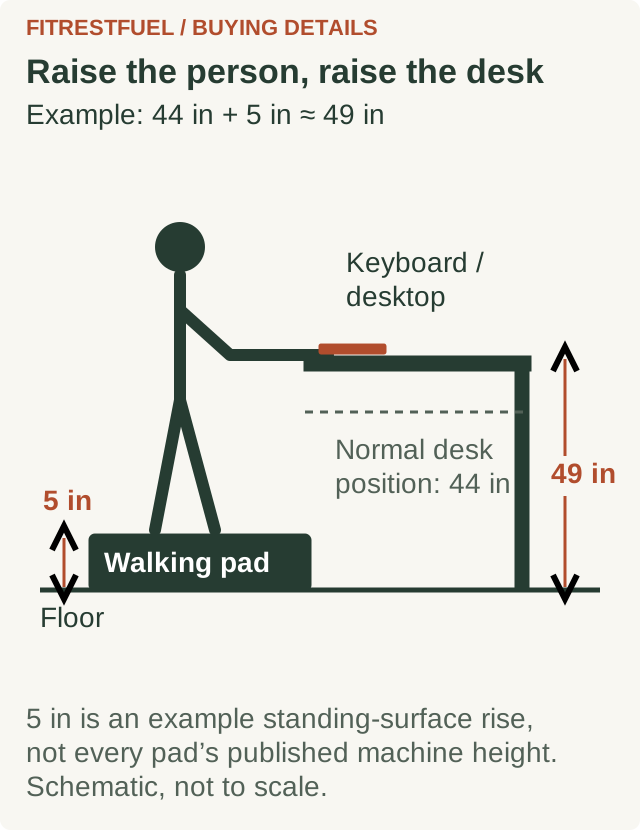
If the walking surface sits about 5 inches above the floor, the keyboard and mouse may also need to move about 5 inches higher to preserve the same relationship between your arms and the desk.
That becomes a problem when your standing desk is already near its maximum height.
You can check this before buying either product.
Jump to a section
The quick calculation
Start with the desk height that feels comfortable when you are standing normally.
Then add the height of the surface you will actually stand on while using the walking pad.
A useful starting calculation is:
comfortable standing desk height + walking-surface height = approximate desk height needed while walking
For example, suppose your keyboard feels right when the desktop is 44 inches from the floor.
If the walking pad raises your feet about 5 inches:
44 + 5 = 49 inches
You would want the desk to reach roughly 49 inches to recreate the same basic keyboard position.
If your desk stops at 47 inches, the setup is already about 2 inches short before accounting for shoes, a mat, unusual deck geometry or personal preference.
This calculation is not a medical prescription. It is a practical compatibility check that tells you whether the desk has enough adjustment range to work with the extra platform under your feet.
Why a few inches matter
OSHA's computer-workstation guidance recommends keeping the shoulders relaxed, elbows close to the body and forearms roughly parallel to the floor. It also recommends positioning the keyboard so the elbows can remain near the torso without forcing the wrists into awkward angles.
If the desk becomes too low relative to your body, you may start reaching downward or changing your wrist and shoulder position to compensate.
The goal is not to hit one universal desk-height number. People have different proportions.
The useful comparison is your position before and after stepping onto the walking pad.
If the walking pad raises you 5 inches, the desk generally needs enough additional travel to compensate for that change.
Real walking pads can add around 4 to 6 inches
The extra height is not theoretical.
WalkingPad currently lists the Z1 at 4.1 inches high when unfolded.
The C2 is listed at 4.9 inches high when unfolded.
The A1 Pro is listed at 5 inches high.
The HitGo H1 Plus sold by WalkingPad is listed at 6.1 inches overall.
Those numbers are useful for screening products, although the manufacturer's total machine height is not always identical to the exact height of the belt surface under your shoes.
If the difference between your required height and your desk's maximum is only half an inch, do not assume the published overall treadmill dimension is precise enough to settle the question.
Measure the real setup when possible.
Example: a WalkingPad C2 with a standing desk
WalkingPad currently lists the unfolded C2 at:
- 56.9 inches long
- 20.4 inches wide
- 4.9 inches high
Suppose your normal standing desk setting is 43 inches.
Using 4.9 inches as a conservative first-pass estimate:
43 + 4.9 = 47.9 inches
A desk topping out at 48 inches would leave almost no adjustment margin.
A desk reaching 50 or 51 inches gives you more room to dial in the actual position.
Now suppose your normal standing setting is already 46 inches.
46 + 4.9 = 50.9 inches
A desk with a 48-inch maximum would be clearly undersized for that combination.
That is why two people can buy the exact same desk and walking pad and have completely different results.
Sources: 2
Your desk's maximum height matters more than the advertised range
Standing-desk specifications often highlight a large adjustment range.
For walking-pad use, the number you care about most is the maximum usable desktop height.
UPLIFT currently lists its V3 standing desk with a 1-inch desktop at 22.6 to 48.7 inches.
Its older V2 configuration is listed higher, with some configurations reaching around 50 inches or more depending on the frame and desktop.
FlexiSpot lists different height ranges for different E7-family configurations as well, with the stated range affected by the specific frame and whether the desktop thickness is included.
Do not assume that a desk marketed for tall users automatically has enough extra range for a walking pad.
The walking pad changes the problem.
Someone who needs a 47-inch desk while standing on the floor may suddenly need something around 52 inches when placed on a 5-inch platform.
Measure your current desk before shopping
You do not need an ergonomic calculator to perform the most useful test.
Step 1: Find your comfortable standing position
Stand at your desk on the floor.
Adjust the desk until typing and mousing feel natural.
Your shoulders should not be shrugged upward. Your elbows should remain close to your sides, and your wrists should not be forced sharply up or down.
Step 2: Measure the desktop
Measure from the floor to the top of the desktop.
Do not rely entirely on the number shown on the desk controller.
UPLIFT, for example, specifically tells owners to compare the controller reading against an actual floor-to-desktop measurement because the display may need calibration.
Write the measured height down.
Step 3: Add the walking-pad height
Use the manufacturer's published height as a preliminary number.
If your normal setting is 44 inches and the machine is about 5 inches high:
44 + 5 = about 49 inches
Step 4: Compare that with the desk's real maximum
Raise the desk fully and measure it.
If the actual top of the desktop reaches 50.5 inches, you appear to have about 1.5 inches of extra range.
If it reaches only 47.5 inches, the combination is unlikely to reproduce your current standing position.
Do not forget desktop thickness
Desk manufacturers do not always describe height in exactly the same way.
One specification may describe frame height.
Another may include a 1-inch desktop.
Another may list the final floor-to-desktop range.
That difference matters when you are working within an inch or two.
If a frame reaches 48 inches before the top is installed, a 1-inch desktop can change the final surface height.
Conversely, if a specification already includes the desktop, adding its thickness again would give you the wrong result.
Check exactly what the manufacturer's height figure measures.
When possible, use the final assembled desktop height rather than the frame specification.
An incline walking pad complicates the calculation
Flat walking pads are relatively straightforward.
Incline models are less so.
If the deck changes angle, the height of your feet relative to the floor can change with the incline setting and with where you stand on the belt.
WalkingPad currently lists the H1 Plus incline treadmill at 6.1 inches overall, already taller than the 4.1-inch Z1 and 4.9-inch C2.
You should not assume that adding exactly 6.1 inches to your desk setting solves the problem at every incline.
For an incline model, confirm the actual standing height at the incline setting you expect to use while working.
The margin matters more here.
A desk that barely reaches the calculated minimum on a flat walking pad may be a poor match for an incline model.
If you are still deciding whether that added complexity is worthwhile, our incline versus flat walking-pad comparison weighs dedicated exercise against desk comfort, belt length and storage.
Shoes and mats can take away more height
The treadmill is not always the only thing between you and the floor.
You may also have:
- athletic shoes
- a protective floor mat
- a treadmill mat
- carpet and padding
- risers or another surface under the machine
Not all of those add their full thickness to your effective height, but they can change the final geometry.
A thin mat is unlikely to transform a suitable desk into an unusable one.
A setup already within a fraction of an inch of the desk's maximum deserves more caution.
Buying with a little unused upward adjustment is safer than planning around the desk being exactly maxed out.
What if your desk is already too low?
If you already own both products and the desk cannot reach high enough, there are several possibilities.
Check the keyboard position first
The entire desktop does not always need to move if the real issue is keyboard height.
An adjustable keyboard platform may help in some workstation layouts, although it needs to be stable and positioned so you can maintain a neutral wrist and elbow position.
Check whether the desk is actually reaching its advertised height
Measure from the floor to the desktop.
Do not assume the controller display is correct.
Some desks allow the displayed height to be calibrated.
Check whether the desk has adjustable feet or casters
Accessories under the desk legs can sometimes change the finished height, but only use components the manufacturer approves for the desk.
Do not improvise unstable risers under a motorized desk.
Consider the machine height when replacing the walking pad
If you are choosing between two otherwise suitable walking pads, a lower deck can recover valuable desk-height margin.
The difference between a 4.1-inch platform and a 6.1-inch platform is 2 inches.
For someone already near the top of a desk's adjustment range, that can determine whether the workstation fits at all.
What if you are buying the desk and walking pad together?
This is the easiest situation because you can plan the system before ordering.
First estimate your normal standing keyboard height.
Then add the walking-pad height.
Finally, choose a desk with some additional upward adjustment beyond that number.
For example:
Normal standing desk setting: 44 inches
Walking pad height: 4.9 inches
Estimated requirement: 48.9 inches
A desk whose maximum is exactly 49 inches leaves almost no margin.
A desk reaching 51 inches gives you more room to adjust for shoes, actual deck height and personal preference.
Do not select the desk based only on your body height.
Select it based on your body height while standing on the walking pad.
Taller users should check this before almost anything else
Walking-pad buyers often compare:
- speed
- noise
- folding
- weight capacity
- belt dimensions
- storage
- price
Those matter.
But if you are tall enough that your existing desk already sits near its maximum height, desk compatibility should move toward the top of the list.
A walking pad that raises you 5 inches does not care whether the desk was advertised for tall users.
The only question is whether the keyboard surface can still reach the position your body needs.
Monitor height is a separate problem
Raising the desk solves the keyboard-height problem, but the monitor still needs to be positioned appropriately.
OSHA recommends keeping the head balanced and generally aligned with the torso rather than constantly tilting upward or downward.
If your monitor is mounted on an adjustable arm, moving between seated, standing and walking positions may be easier.
A laptop creates a harder compromise because its keyboard and screen are physically attached.
Raising the laptop high enough for comfortable viewing can put the keyboard too high, while lowering it for typing can put the screen too low.
A separate keyboard and mouse can make a walking workstation easier to adjust.
A walking pad does not automatically require a new desk
Do the measurement before replacing anything.
If your standing desk still has 6 inches of unused upward travel and the walking pad raises you around 4 to 5 inches, your existing desk may work perfectly well.
If your desk has only 1 inch left, the combination is much more questionable.
This is one of those purchases where the spec sheet becomes useful only after you know your own number.
Measure your comfortable standing desk height first.
Then add the height of the walking surface.
That will tell you far more than a product page claiming that a desk is suitable for "most users."
Before you buy
Measure four things:
- your comfortable standing desktop height
- the walking pad's actual or published deck height
- the desk's measured maximum desktop height
- any extra height from the setup underneath your feet
Then calculate:
standing height + walking-pad height = approximate walking workstation height
If that number sits comfortably below your desk's maximum, the combination has room to work.
If it meets or exceeds the maximum, solve that problem before ordering.
A walking pad should make it easier to move while you work. It should not force you to spend the day reaching down toward a desk that no longer fits you.
Sources & research notes
Sources checked November 11, 2026. Manufacturer dimensions describe the listed models, not measurements of the belt height beneath your feet. The examples are calculations, not hands-on testing or personalized ergonomic prescriptions. Use the actual assembled setup when the available adjustment margin is small.
- WalkingPad Z1: unfolded machine dimensions (opens in new tab)
- WalkingPad C2: unfolded machine dimensions (opens in new tab)
- WalkingPad A1 Pro: unfolded machine dimensions (opens in new tab)
- WalkingPad: HitGo H1 Plus specifications and incline (opens in new tab)
- UPLIFT V3 Laminate Standing Desk: desktop thickness and height range (opens in new tab)
- UPLIFT V3 C-frame specifications: frame height and optional foot spacers (opens in new tab)
- UPLIFT V2 specifications: frame height before the desktop (opens in new tab)
- FlexiSpot E7: configuration-specific height ranges without the top (opens in new tab)
- UPLIFT V2 manual: Advanced Keypad height calibration (page 15) (opens in new tab)
- OSHA: neutral working positions (opens in new tab)
- OSHA: keyboard height, distance and adjustable trays (opens in new tab)
- OSHA: monitor position and viewing height (opens in new tab)