Keurig My K-Cup 3.0 vs. Older Reusable Filters: Which Fits Your Coffee Maker?
The newer My K-Cup fits inside the original pod holder, while certain older filters replace it. Identify your filter before buying another one.
Sources last checked November 24, 2026.
Keurig redesigned its My K-Cup reusable coffee filter in 2025, and the new version installs differently from certain older filters.
The My K-Cup 3.0 fits inside the brewer's existing pod holder. Earlier universal and MultiStream filters require you to remove that holder on certain compatible machines.
Compatibility changed, too. The redesigned filter supports K-Brew + Chill, but Keurig excludes its 2.0 brewers, K-Crema and commercial coffee makers.
If you've followed an installation video and your brewer won't close, you may be using instructions for a different filter generation.
Before buying another reusable filter, identify both your coffee maker and the accessory you already own.
Jump to a section
Which My K-Cup reusable filter do you have?
Keurig has used similar product names for several different reusable coffee filter designs.
Look at the lid, the removable components and how the filter installs.
On a small screen, swipe the table sideways.
| Filter design | How to identify it | Main installation difference |
|---|---|---|
| Earlier universal filter | Removable twisting lid, separate filter basket and removable Plus Series adapter | Replaces the original pod holder in applicable Classic brewers |
| Older MultiStream universal filter | Removable twisting lid with multiple openings, red lid plug and removable Plus Series adapter | Replaces the original pod holder in applicable non-Plus brewers |
| My K-Cup 3.0, redesigned in 2025 | Hinged lid with a latch, removable basket and red lid plug | Fits inside the existing pod holder |
The first two designs are particularly easy to confuse because they share a similar removable-lid arrangement.
The older MultiStream version has five openings in the lid and a removable plug that covers the four outer openings. The earlier universal filter shown in Keurig's Classic and Plus Series instructions does not have that same lid arrangement.
The newer 3.0 version is easier to identify because its lid opens on a hinge rather than twisting off.
These are three documented designs, not a complete history of every My K-Cup accessory Keurig has sold.
If your filter looks different from all three, find its original instructions before using it.
How to Identify Your My K-Cup Filter Generation
Three Keurig My K-Cup reusable filter designs compared by lid type, red plug and Plus Series adapter. Schematic, not to scale.
Earlier universal filter

- Detachable twisting lid
- Removable filter basket
- Outer filter holder
- Detachable Plus Series adapter
Older MultiStream universal filter

- Detachable twisting lid with five openings
- Separate red plug covers four outer openings
- Removable filter basket
- Outer filter holder
- Detachable Plus Series adapter
2025 My K-Cup 3.0
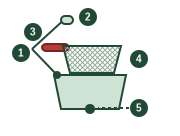
- Attached hinged lid
- Lid latch
- Red lid plug
- Removable filter basket
- Bottom alignment opening
Which reusable filter fits your Keurig?
The table combines Keurig's 2025 compatibility chart with historical instructions for its older universal filters.
The newer filter has broad support across Keurig home brewers, but some important exceptions remain.
On a small screen, swipe the table sideways.
| Coffee maker or family | Earlier universal filter | Older MultiStream universal filter | 2025 My K-Cup 3.0 |
|---|---|---|---|
| Applicable Classic Series / 1.0 brewers | Confirmed | Confirmed for applicable models | Confirmed family |
| Keurig 2.0 / applicable Plus Series | Confirmed with adapter | Confirmed with adapter | Incompatible |
| Original K-Supreme | Not supported | Confirmed | Confirmed |
| K-Compact | Check exact model | Check exact model | Confirmed family |
| K-Express | Not verified | Check exact model | Confirmed family |
| K-Elite | Check exact model | Check exact model | Confirmed family |
| K-Select | Check exact model | Check exact model | Confirmed family |
| K-Slim | Check exact model and generation | Check exact model and generation | Confirmed family |
| K-Mini and K-Mini Plus | Check exact model | Check exact model | Confirmed family |
| K-Café and K-Latte | Check exact model | Check exact model | Confirmed families |
| K-Duo | Check exact model | Check exact model | Confirmed family |
| K-Brew + Chill | Not verified | Not verified | Confirmed |
| K-Crema | Incompatible | Incompatible | Incompatible |
| K-Mini Mate | Not verified | Conflicting evidence | Owner reports suggest compatibility; not conclusively verified |
| K-Mini Mate Plus | Not verified | Not verified | General My K-Cup support documented; exact filter version unconfirmed |
| Commercial Keurig brewers | Not verified | Not verified | Incompatible |
"Confirmed family" means Keurig includes the named brewer family in its 2025 compatibility chart. Check the exact model if you own a newer or unusual variation.
"Not verified" means we have not established that particular combination. It does not necessarily mean the accessory cannot fit.
Keurig's 2025 chart also includes applicable Essentials, Plus, Special Edition and Smart extensions of the named families.
For K-Supreme owners, the original brewer manual specifically warns against using reusable filters predating the then-new MultiStream design. That historical restriction does not exclude the subsequently supported 2025 filter.
Keurig's current U.S. product listing separately excludes K-Crema.
My K-Cup 3.0: Keep the original pod holder installed
If you own the hinged-lid version introduced in 2025, don't remove the brewer's standard pod holder just because an older My K-Cup video tells you to.
The redesigned accessory sits inside that holder.
Once you've confirmed compatibility:
- Wash and prepare the reusable filter according to its instructions.
- Configure the red lid plug for your brewer's water-delivery technology, as explained below.
- Add ground coffee without exceeding the maximum fill mark.
- Close the filter lid until its latch engages.
- Open the brewer handle and place the reusable filter inside the existing pod holder.
- Use the filter's orientation markings and align its bottom opening with the exit needle.
- Check that the filter sits flush inside the holder.
- Close the brewer handle normally.
Keep your fingers clear of the brewer's sharp needles.
If the handle won't close normally, stop and check the installation rather than pressing harder.
Don't start brewing until the compatible accessory is seated correctly.
Older My K-Cup filters: Why the original pod holder may need to come out
The earlier universal filter has a different installation arrangement.
Keurig's Classic Series instruction sheet directs owners to remove the brewer's standard pod holder, detach the reusable filter's Plus Series adapter, and install the assembled reusable filter in the resulting space.
The older MultiStream universal filter uses a similar arrangement for the non-Plus brewers covered by its instructions.
If you're switching from one of these older arrangements to My K-Cup 3.0, you may need to reinstall the original pod holder that you previously removed.
Keep that original component somewhere safe if you still use an older filter.
Switch off and unplug the brewer and let it cool before removing or reinstalling its pod holder. Follow the instructions for your particular machine and keep your fingers away from the needles.
Earlier Classic Series filter instructions.
Older MultiStream universal filter instructions.
Does the Original Pod Holder Stay In?
Older compatible My K-Cup filter replacing the original pod holder compared with the 2025 My K-Cup 3.0 fitting inside the existing holder. Schematic, not to scale.
Original pod holder removed
Applicable older Classic or non-Plus arrangement

- Brewer housing
- Older reusable filter occupies the opening
- Original pod holder set aside
Original pod holder stays in
2025 My K-Cup 3.0
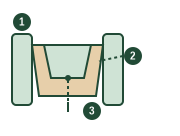
- Brewer housing
- Original pod holder stays around the reusable filter
- Filter opening aligns with the exit needle
What is the Plus Series adapter?
The Plus Series adapter is a removable component attached to the outside of certain older reusable filters.
It is separate from both the original brewer pod holder and the red plug underneath the reusable filter's lid.
Keurig's earlier universal-filter instructions specify two arrangements:
- Applicable Classic Series machines use the filter without the Plus Series adapter.
- Applicable Plus Series machines require the adapter to remain attached.
The older MultiStream universal filter's instructions make the same distinction.
If you own a compatible Keurig 2.0 brewer, removing that adapter just because a Classic Series video recommends doing so can leave you with the wrong configuration.
The earlier Plus Series instructions also specify that the adapter arm faces the user during installation.
By contrast, the applicable older MultiStream non-Plus instructions specify an orientation with the lid's arrow facing the back of the brewer.
Follow the instructions matching your accessory and brewer rather than borrowing an installation sequence from another version.
Keurig 2.0 and My K-Cup 3.0 are different things
The numbers in these product names can be misleading.
Keurig 2.0 refers to a generation of coffee makers.
My K-Cup 3.0 refers to the redesigned reusable coffee filter.
They aren't successive versions of the same product.
Keurig's 2025 compatibility chart specifically excludes the K200, K300, K400 and K500 series 2.0 brewers.
If you own one of those machines, buying the newest reusable filter is not an upgrade.
Certain earlier universal and older MultiStream reusable filters were designed to work with applicable Plus Series machines when the correct adapter was installed.
If you already own one of those compatible filters and it works correctly, keep using it.
If you need a replacement, verify the actual older filter generation and its compatibility before ordering. A listing titled "Universal My K-Cup" may describe a different accessory from the one you need.
Availability of specific older filter versions has not been established.
Which reusable filter works with K-Brew + Chill?
Keurig identifies K-Brew + Chill compatibility as one of the reasons for its 2025 My K-Cup redesign.
If you're buying a Keurig-branded reusable filter for this machine, the 3.0 design is the manufacturer-confirmed option covered here.
Look for the hinged lid rather than relying on the word universal.
Compatibility with the two older designs hasn't been established.
Don't assume that an older MultiStream-compatible filter also supports K-Brew + Chill simply because both products use multiple water streams.
Does My K-Cup work with K-Crema?
No. Keurig explicitly excludes K-Crema from the current My K-Cup product listing.
The K-Crema owner's guide also states that the machine doesn't support reusable coffee filters or fiber and mesh pods.
That restriction is broader than a warning about one particular generation of My K-Cup.
Buying an older version isn't a solution.
The fact that K-Crema accepts disposable K-Cup pods doesn't change the reusable-filter restriction.
What about K-Mini Mate and K-Mini Mate Plus?
These machines need separate consideration from the original K-Mini and K-Mini Plus.
Keurig's April 2025 compatibility chart lists the K-Mini family and applicable extensions. It doesn't specifically name either Mate model.
K-Mini Mate
The available evidence is mixed.
A response attributed to Keurig Care on Target's K-Mini Mate listing recommends an older MultiStream universal filter arrangement that involves removing the original pod holder and the reusable filter's base adapter.
However, some owners report that removing the original holder prevents the brewer from closing properly.
Other owners report that the newer reusable filter works when the original holder remains installed.
These accounts suggest that the filter generation may explain some of the conflicting experiences. They don't establish compatibility for every K-Mini Mate and My K-Cup combination.
Target K-Mini Mate product questions.
Owner discussion about the older and newer reusable filters.
Additional owner reports about the newer filter.
K-Mini Mate Plus
There is stronger evidence of general My K-Cup support for this model.
Two separately hosted copies of the manufacturer-authored K-Mini Mate Plus guide identify My K-Cup as a supported accessory for brewing ground coffee.
A response attributed to Keurig Care on Kohl's website also confirms general My K-Cup compatibility.
However, the reviewed manual wording doesn't identify the exact reusable filter generation or provide a generation-specific installation procedure. A conflicting customer response appears on the same retailer listing.
The manufacturer-authored documentation carries more weight than that customer response, but it still leaves the exact accessory version unclear.
Manufacturer-authored K-Mini Mate Plus guide, hosted by Manuals+.
Additional copy of the K-Mini Mate Plus guide.
Kohl's reusable-filter product questions.
What should you do if you own either Mate model?
Contact Keurig with the exact brewer model and reusable filter you intend to use.
Specify whether your filter has a hinged lid or a removable twisting lid.
Ask whether that particular accessory is supported and whether the original pod holder should remain installed.
Don't remove components or force the brewer closed to make an uncertain combination fit.
Should you remove the red lid plug?
The removable red plug appears on more than one filter design, which is why identifying the accessory matters.
My K-Cup 3.0
For the redesigned 2025 filter, Keurig's preparation instructions make a clear distinction.
On a small screen, swipe the table sideways.
| Compatible brewer technology | Red lid plug |
|---|---|
| Single-stream | Retain the plug as instructed |
| MultiStream Technology | Remove the plug before brewing |
Check your brewer's documentation if you're unsure which water-delivery technology it uses.
Keurig also instructs owners to remove the plug during cleaning and reassemble it as appropriate for the next brew.
The plug is not the Plus Series adapter. Removing one doesn't accomplish the same thing as removing the other.
Older MultiStream universal filter
The older removable-lid MultiStream filter also has a red plug beneath its lid.
However, its historical instruction sheets tell owners to remove the plug for cleaning and reinstall it afterward. They don't clearly describe a separate preparation arrangement for MultiStream brewing.
Owners have reported receiving conflicting advice about whether to remove it.
We couldn't establish a sufficiently clear, generation-specific manufacturer instruction resolving that discrepancy for every applicable brewer.
Don't automatically apply the new 3.0 plug instructions to the older filter.
If you're uncertain about preparing the older accessory for your exact machine, ask Keurig to confirm the correct arrangement before brewing.
Why won't your Keurig close with a reusable filter installed?
A handle that won't close normally can be a sign that the filter, brewer or installation arrangement doesn't match.
Work through these checks before deciding the accessory is defective.
On a small screen, swipe the table sideways.
| What you find | What to check |
|---|---|
| Hinged-lid 3.0 filter, original pod holder removed | Recheck the current instructions and reinstall the correct original holder |
| Older twisting-lid filter sitting inside the original holder | Check whether that particular older arrangement requires the holder to be removed |
| Older filter with its Plus Series adapter still attached | Verify whether your brewer requires that adapter |
| Filter sits at an angle or protrudes above its intended position | Check the documented orientation and seating |
| Correct-looking filter in an excluded brewer | The accessory may be incompatible regardless of its appearance |
| Correct filter still does not fit according to its instructions | Stop and contact Keurig |
Allow the brewer and accessory to cool before handling components.
Never force the handle closed, cut the filter or modify the needles to accommodate a mismatched accessory.
If your brewer closes correctly but still produces less coffee than usual, our guide to coffee makers brewing less than expected explains other possible causes.
How much coffee should you put in My K-Cup?
Use the fill markings on the actual filter you own.
Some older filters have separate cup and travel-mug markings. Other older instruction sheets show a single maximum fill line.
For the redesigned 2025 filter, Keurig instructs owners to stay within its marked maximum capacity.
Don't compress the grounds to fit more coffee inside. Overfilling or packing the grounds tightly can interfere with brewing.
What grind size should you use?
Keurig's current support article gives two slightly different starting recommendations.
Its main preparation guidance suggests a medium grind, while its FAQ recommends starting with a coarser grind similar to what you'd use for a French press.
Both advise against very fine espresso-style grounds, which can obstruct the filter.
Start with the instructions for your particular accessory and make small adjustments if necessary.
The reviewed My K-Cup filters are intended for ground coffee, not loose tea, cocoa or powdered beverages.
Can you use a paper filter inside My K-Cup 3.0?
Yes. Keurig's 2025 instructions allow paper liners, provided you retain the included filter basket.
The mesh basket remains part of the required brewing arrangement.
Don't remove the basket and substitute a paper liner on its own.
These instructions establish that arrangement for the redesigned filter. Check the instructions for your particular accessory before using liners with an older version.
How do you clean the reusable filter?
Wait until the reusable filter has cooled after brewing.
For the 2025 version, remove the used grounds, filter basket and red plug before washing.
You can wash the components by hand with warm, soapy water or secure them on the top rack of a dishwasher.
Leave the hinged lid attached to the filter body.
After washing, rinse and air-dry the components before reassembling them for your brewing arrangement.
Keurig recommends cleaning the new filter before its first use, rinsing away residue after each brew and washing it more thoroughly at least weekly.
The older removable-lid designs have different disassembly instructions. The historical guides reviewed here also permit top-rack dishwasher cleaning.
Washing coffee residue from a reusable basket is different from removing mineral deposits inside the machine.
Our guide to the difference between cleaning and descaling explains those separate maintenance tasks.
Can you use a Keurig My K-Cup filter in a Ninja coffee maker?
Don't assume compatibility simply because both machines accept disposable K-Cup pods.
Certain Ninja coffee makers use their own pod adapters and separate ground-coffee brewing arrangements.
The manufacturer instructions for several Ninja models explicitly exclude reusable K-Cup filters from their specified pod adapter setups.
If you own a Ninja, see our guide to Ninja coffee maker pod adapter compatibility before ordering a replacement accessory.
A reusable brewing filter shouldn't be confused with a water filter that sits inside the coffee maker's reservoir. Those products perform entirely different jobs.
Do you actually need the newest My K-Cup?
If your existing reusable filter is compatible, undamaged and works correctly, keep using it.
The 2025 redesign is particularly relevant if you own K-Brew + Chill or need a current filter for one of Keurig's supported brewer families.
It isn't a suitable replacement for a compatible older My K-Cup used in a Keurig 2.0 machine.
When shopping online, identify the physical filter generation from its description and photographs before ordering.
Keurig's current product page uses the familiar My K-Cup product name. Some retailers still use similar names for older designs.
Target lists the redesigned accessory explicitly as My K-Cup 3.0.
Use that listing as an identification reference. Make sure the filter matches both your brewer and the hinged-lid design before ordering.
If the problem is an installation mistake rather than an incompatible accessory, you may not need to purchase anything.
Manufacturer sources
Sources last checked November 24, 2026.
- Keurig's April 1, 2025 compatibility and installation guide (opens in new tab)
- Keurig U.S. My K-Cup product listing (opens in new tab)
- Alternative manufacturer-hosted product listing containing compatibility exclusions (opens in new tab)
- Earlier universal reusable filter instructions for Classic Series brewers (opens in new tab)
- Earlier universal reusable filter instructions for Plus Series brewers (opens in new tab)
- Older MultiStream universal filter instructions, including applicable non-Plus and Plus Series arrangements (opens in new tab)
- Alternative copy (opens in new tab)
- Original K-Supreme Use & Care Guide (opens in new tab)
- K-Crema Use & Care Guide (opens in new tab)
- K-Mini Mate Plus Use & Care Guide (opens in new tab)
The historical instruction sheets and separately hosted brewer manuals are manufacturer-authored documents hosted by third parties.
Retailer questions and owner discussions are identified separately from official manufacturer instructions.
This comparison is based on documentation rather than FitRestFuel hands-on compatibility testing.